There is an option for custom pages to disable the Back button (BackEnabled). Is there also a function available to disable the Next button?
DOCa Cola
Disable "Next" button on custom page
20 posts
Why would you disable the Next button? The user won't be able to continue.
Yea, but i want to re-enable it after some actions on the page were made by the setup
You can always disable the Next button by sending a message to it (using SendMessage).
Hm, i tried that, but the send message actions are only shown after i reload the window by reentering the page again
You can't disable windows (a button is a window too) by sending a message you have to set the style window long. What exactly are you trying to achieve? Maybe we could help you find a possible way.
I also don't understand what you want to archieve. Please give an example and tell exactly what you want.
after i tried to explain my problem, i realized that i have made an error in my thinking (i should go to bed now) :P
sorry
but i have another question now 🙂
how to prevent it that after a user has clicked the next button on a custom page, that he get on the following page and instead stays on the current custom page (that is only after a check has failed, otherwise he can proceed to the next page)
sorry
but i have another question now 🙂
how to prevent it that after a user has clicked the next button on a custom page, that he get on the following page and instead stays on the current custom page (that is only after a check has failed, otherwise he can proceed to the next page)
Either use InstallOptions' own validation engine or have a look at this example:
my main problem is that the validation even is executed when back or cancel is clicked. this is not the case in the example you gave me, maybe because i use modern ui...
The example I gave you checks for the output of InstallOptions, nothing to do with the MUI which it doesn't use. InstallOptions's built-in validation is only called when the user clicks the next button. Have a look at the readme for more information.
Ok, i still need to disable the next button (i am very confused 😁)
Ok, here you can choose a cd drive
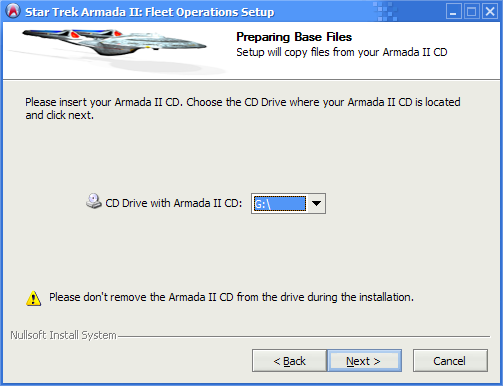
And here are some file actions from the cd needed for the further installation...oh, wrong cd drive 🙂
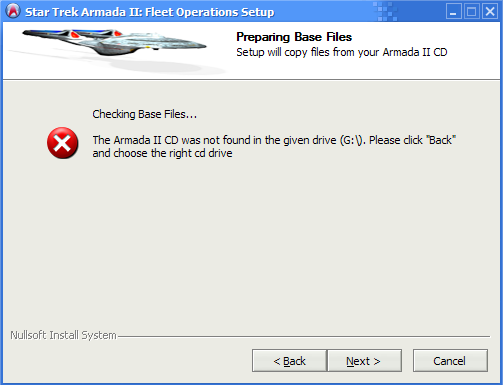
^and here i need to disable the next button
Ok, here you can choose a cd drive
And here are some file actions from the cd needed for the further installation...oh, wrong cd drive 🙂
^and here i need to disable the next button
Imho you should not use a separate page but display a MessageBox immidiately.
The problem is that the leave function (which allows you to stay on the page) is not available for custom pages. I'm sure kichik can change that a bit earlier (it's currently on the TODO for beta 4).
The problem is that the leave function (which allows you to stay on the page) is not available for custom pages. I'm sure kichik can change that a bit earlier (it's currently on the TODO for beta 4).
oh, i see, thx
that would be nice
that would be nice
Nope, KiCHiK can't. Use the same code as in this example for now:
Done, waiting for you in the latest CVS version. Use NSIS Update to get it.
nice, thx
I find the topic opener's question rather interesting. Can anyone tell me why the InstallOptions-plugin doesn't support a "NextEnabled" value in the "Settings" section?
I just stumbled on a case where such an option would be very handy:
I've created a custom page that's only showed when something is wrong (some required files are missing). In that case the next-button should be disabled, because continueing the installion without these required files wouldn't make sense (apart from the fact that it would also be impossible).
I understand there are other ways to disable the button (e.g. by using SetWindowLong()) and ofcourse I could even go a totally different way to stop the installer, but it would be far easier if InstallOptions would support it. And it would make perfectly sense to add it, because it already has a "BackEnabled" value.
So why isn't it included?
I just stumbled on a case where such an option would be very handy:
I've created a custom page that's only showed when something is wrong (some required files are missing). In that case the next-button should be disabled, because continueing the installion without these required files wouldn't make sense (apart from the fact that it would also be impossible).
I understand there are other ways to disable the button (e.g. by using SetWindowLong()) and ofcourse I could even go a totally different way to stop the installer, but it would be far easier if InstallOptions would support it. And it would make perfectly sense to add it, because it already has a "BackEnabled" value.
So why isn't it included?
Use EnableWindow in combination with the initdialog/show functions. These INI file settings are only provided for backwards compatibility.
Yeah, I already got that working using EnableWindow:
That wasn't the problem. I'm just curious why InstallOptions doesn't support disabling the Next button...; Disable Next button (dialog item id 1 in "modern.exe")
GetDlgItem $NextButtonHandle $HWNDPARENT 1
EnableWindow $NextButtonHandle 0