I was wondering if License Page is ready to
convert the "Accept" Button to one or two
RadioButtons.
This is my feature request for Nsis.
Or maybe let the Modern UI create one.
👍
License Page ready for RadioButtons?
24 posts
I have a working test now of the system. Maybe I'll add it to the Modern UI, but it will require an update of all language files 🙁
Do you have a screenshot of an installer with this layout?
Do you have a screenshot of an installer with this layout?
what about one with a checkbox?
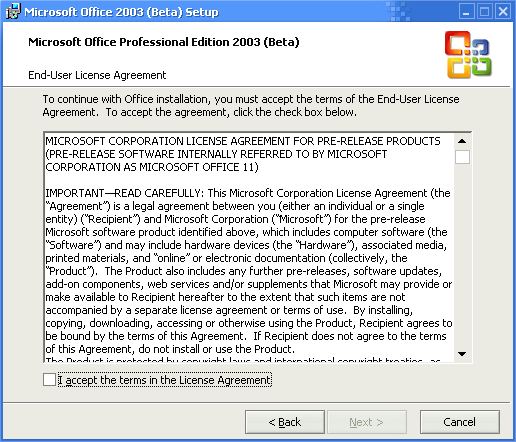
That looks nice. What do you think Dark Boy?
Looks fine to me 👍
It'll be not to much the change
of the languages files.
Only add the Text
"( ) I Agree ... "
"( ) No Agree ..."
😛
But, you can always count on me with
the spanish translation 😁
See this screen from Inno
PS1: Sorry for Inno thing 🙁 though is a good example 😁
PS2: A beta for Office 2003? 😱
It'll be not to much the change
of the languages files.
Only add the Text
"( ) I Agree ... "
"( ) No Agree ..."
😛
But, you can always count on me with
the spanish translation 😁
See this screen from Inno
PS1: Sorry for Inno thing 🙁 though is a good example 😁
PS2: A beta for Office 2003? 😱
in my opinion the checkbox thing better fits for mui, the radio buttons need too much space on the license page
Good idea 👍 and disable the "Next" Button until
de user check the "checkbox" .... Good idea
But about the space, is almost the same as the checkbox
de user check the "checkbox" .... Good idea
But about the space, is almost the same as the checkbox
The plan was to add an option for both.
It's a good plan ...
But it'll be only for Modern UI or
Both Modern UI and default UI?
But it'll be only for Modern UI or
Both Modern UI and default UI?
Disabling the Next button is not possible. I can add an option for radio buttons to the Modern UI.
i see 🙁
is it the same thing that i requested a month ago that disabling the next button not works?
is it the same thing that i requested a month ago that disabling the next button not works?
There is no way to catch the click-event for the checkbox.
Well, checkboxes and radiobuttons are now implemented, right?
Yes they are. Keep reading.
Can you also integrate an option for an basic license page without the description labels?
something like this, just with the radio buttons/checkbox
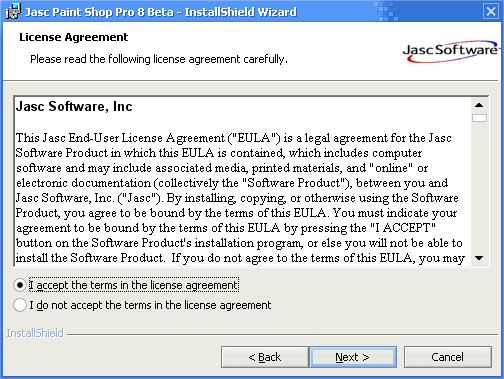
something like this, just with the radio buttons/checkbox
Like a readme?
Yeah that will be a cool feature 👍
Readme - What are you going to installed (system req. etc)
License - Free, share, bla bla $$$
Yeah that will be a cool feature 👍
Readme - What are you going to installed (system req. etc)
License - Free, share, bla bla $$$
hm, a readme page can be done with custom page commands i think
i meant a license page just with the license textbox and NO description labels like "Press Page Down to see the rest of the agreement." or "If you accept the terms of the agreement, click..." , but with the agree button, radio buttons or the checkbox
i meant a license page just with the license textbox and NO description labels like "Press Page Down to see the rest of the agreement." or "If you accept the terms of the agreement, click..." , but with the agree button, radio buttons or the checkbox
I'm no expert with resource hacker, but here's what I did:
I just used resource hacker to delete the text controls above and below the license control, and then stretched the license control upwards and downwards.
I tested, it seems ok here as you can see:
I just used resource hacker to delete the text controls above and below the license control, and then stretched the license control upwards and downwards.
I tested, it seems ok here as you can see:
ooops, forgot to attach the new ui - you'd need that i suppose. :P
hope this is what you had in mind.
Salaam/Peace.
hope this is what you had in mind.
Salaam/Peace.
Originally posted by DOCa ColaI don't think that you can create a Page with the same features
hm, a readme page can be done with custom page commands i think
as the license page, because it uses the RichtEdit box.
InstallOptions doesn't have that option. Althought can be
a cool feature 😁
[edit]
Or maybe a few Labels to create the Readme Text
in IO; but sounds "gray" to me 👎
[/edit]
Originally posted by Dark BoyYou are right, i didn't thought of that. Yep, a readme page or something would be a nice feature
I don't think that you can create a Page with the same features
as the license page, because it uses the RichtEdit box.
Originally posted by psykethx! that's what i wanted
ooops, forgot to attach the new ui - you'd need that i suppose. :P
hope this is what you had in mind.
Salaam/Peace.
glad I could help. 🙂
Salaam/Peace.
Salaam/Peace.