Hi everyone. More noticed that inetc not load files by https in WinXP, but without problems downloads it in Win7 and above.
http + ftp download plug-in
545 posts
INetC uses the WinINet API and XP is so old now that it does not support all the latest TLS/SSL crypto algorithms that some sites are using. There is a TLS setting in Internet Options that might help...Originally Posted by simplix View PostHi everyone. More noticed that inetc not load files by https in WinXP, but without problems downloads it in Win7 and above.
FTP put problem
How do I FTP upload when the destination directory doesn't exist? I've tried the obvious thing, but that results in inetc:😛ut getting stuck in an infinite loop.
Script is simple:
If "newdir" already exists, then everything works as expected.
How do I FTP upload when the destination directory doesn't exist? I've tried the obvious thing, but that results in inetc:😛ut getting stuck in an infinite loop.
Script is simple:
"newdir" does not exist. When examining network traffic, I see this:RequestExecutionLevel user
outFile "ftptest.exe"
Section
inetc:😛ut "ftp://ftpserver//newdir/test.txt" "$EXEDIR\test.txt"
SectionEnd
etc. It keeps making that same request, adding another slash on the end each time until eventually the installer crashes.STOR /newdir/test.txt
550 File cannot be created
MKD /newdir
257 "/newdir" created
MKD /newdir/test.txt
257 "/newdir/test.txt" created
MKD /newdir/test.txt/
257 "/newdir/test.txt/" created
MKD /newdir/test.txt//
If "newdir" already exists, then everything works as expected.
Is there likely to be a fix for the security vulnerability mentioned here?: http://www.kb.cert.org/vuls/id/894897
Have you tried to contact the author of the plugin?Originally Posted by DwayneVogler View PostIs there likely to be a fix for the security vulnerability mentioned here?: http://www.kb.cert.org/vuls/id/894897
I assumed that the author would be watching this thread since this is linked in the download page for the plugin. Or that the community might know something since this is a few months old and high in my google results for "intetc".
I uploaded a new version, use /WeakSecurity to fall back to the old behavior.
I'll also attach a special test build here that tries to use binary mode when requesting the size over FTP.
I'll also attach a special test build here that tries to use binary mode when requesting the size over FTP.
inetc::get return value R0 is "U"?!
Small test case that reproduces the issue:
What am I doing wrong?
Small test case that reproduces the issue:
The first MessageBox shows just the capital letter “U”, which is not supposed to be one of the return values, right?OutFile "test-installer.exe"
Section
inetc::get "https://tibiamaps.github.io/tibia-map-data/Automap-with-markers.zip" "$pluginsdir\Automap.zip"
Pop $R0 ; Get the return value.
MessageBox MB_OK $R0
StrCmp $R0 "success" +3
MessageBox MB_OK "Download failed; try again later."
Quit
Pop $0
end:
SectionEnd
What am I doing wrong?
A single letter usually means you mismatched the plugins. Are you using the Unicode version of the plugin in a Ansi installer?Originally Posted by amalilith View PostWhat am I doing wrong?
I would also recommend that you use the /END parameter at the end of that plugin function call!
I was indeed using the wrong version of the plugin. Thanks for the help!Originally Posted by Anders View PostA single letter usually means you mismatched the plugins. Are you using the Unicode version of the plugin in a Ansi installer?
I would also recommend that you use the /END parameter at the end of that plugin function call!
Hello Everyone.
I'm having SendRequest Error if checking some sites.
For example, I'd like to get headers:
inetc::head /SILENT "https://35.169.75.153/" "D:\0.txt" /END
-> SendRequest Error
That's a random site - www.quora.com - I need smth else but anyway...
Also if I try this:
inetc::head /SILENT "https://www.quora.com/" "D:\0.txt" /END
-> Access Forbidden (403)
Please, help would be appeciated.
I'm having SendRequest Error if checking some sites.
For example, I'd like to get headers:
inetc::head /SILENT "https://35.169.75.153/" "D:\0.txt" /END
-> SendRequest Error
That's a random site - www.quora.com - I need smth else but anyway...
Also if I try this:
inetc::head /SILENT "https://www.quora.com/" "D:\0.txt" /END
-> Access Forbidden (403)
Please, help would be appeciated.
https://35.169.75.153/ does not work in a modern browser either, it will not be able to match the certificate to the host. Adding the /WEAKSECURITY INetC option might be able to work around that.
403 is "The server understood the request, but is refusing to fulfill it. Authorization will not help and the request SHOULD NOT be repeated."
403 is "The server understood the request, but is refusing to fulfill it. Authorization will not help and the request SHOULD NOT be repeated."
No, /WEAKSECURITY not working.
I guess I need 0x3300 flag to be set.
Is there any instruction of how to compile Inetc project?
I guess I need 0x3300 flag to be set.
Is there any instruction of how to compile Inetc project?
And that is what? No flag is going to fix the 403 I'm guessing.Originally Posted by KnightRiderX View PostI guess I need 0x3300 flag to be set.
Depends on your setup of course. In Visual Studio you can probably just create a .dll project and add the source files.Originally Posted by KnightRiderX View PostIs there any instruction of how to compile Inetc project?
I just mentioned 403 but my error is SendRequest Error. And I know that I need 0x3300 to be set. I have compiled the project but what should I do to make a .dll? I'm not a C++ guy.Originally Posted by Anders View PostAnd that is what? No flag is going to fix the 403 I'm guessing.
This is URL I need to get data from:
inetc::head /SILENT /WEAKSECURITY "https://35.189.228.145:443/win64" "D:\0.txt" /END
And still SendRequest Error.
inetc::head /SILENT /WEAKSECURITY "https://35.189.228.145:443/win64" "D:\0.txt" /END
And still SendRequest Error.
INetC uses the same HTTP library as Internet Explorer. Does that URL work in IE?
Ah, thanks a lot!! I couldn't get this plugin to work because now I have a "https:" URL to download from! The link works in all browsers and other situations (perl get script), but when I tried it in IE, I got this:Originally Posted by Anders View PostINetC uses the same HTTP library as Internet Explorer. Does that URL work in IE?
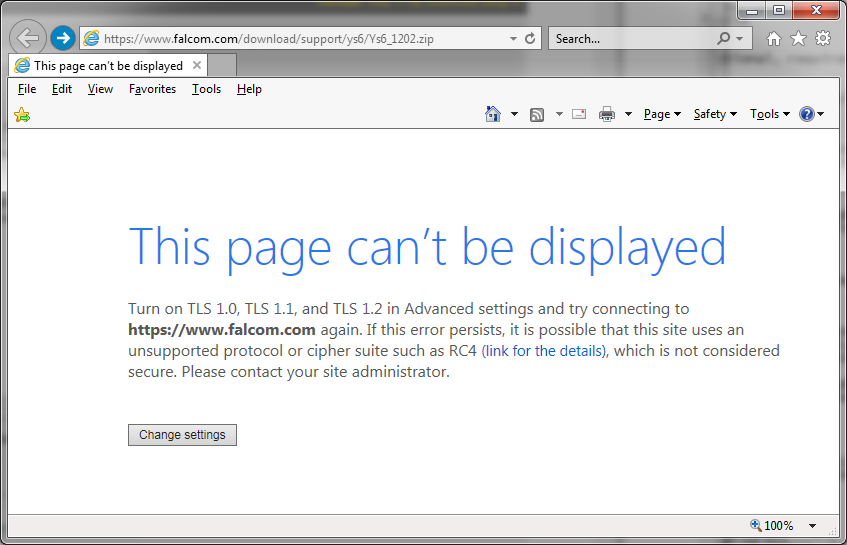
I guess I'll have to research what registry keys were turned off that represent TLS 1.0, TLS 1.1, and TLS 1.2, and set them on during NSIS execution/installation.
FIXED!
The code goes something like this:
It's just simple enough to restore the value to whatever it was after you're done using the plug-in. I don't wanna figure out how to AND on the bit to just turn on TLS 1.2 and leave it on... That's the only protocol I needed on for that particular link to work.
I turned a lot of IE settings off cause I don't trust the browser and only use it for testing/development, so that's how I ran into this problem myself. I'm surprised this plug-in has a dependency to IE like this, I would've hoped it just uses the winsock API directly to get the job done, but free is free.
The code goes something like this:
Code "0x00000A80" for the SecureProtocols DWORD value in the IE registry is the default when you reset settings. TLS 1.0, 1.1, 1.2 are all turned on by default.
!define IE_NETCONFIG "Software\Microsoft\Windows\CurrentVersion\Internet Settings"


Function DownloadFile

  ReadRegDWORD $9 HKCU "${IE_NETCONFIG}" "SecureProtocols"

  WriteRegDWORD HKCU "${IE_NETCONFIG}" "SecureProtocols" 0x00000A80


  inetc::get "https://www.falcom.com/download/support/ys6/Ys6_1202.zip" "$INSTDIR\file.zip"


#do stuff


# Restore IE settings to original value

  WriteRegDWORD HKCU "${IE_NETCONFIG}" "SecureProtocols" $9

FunctionEnd
It's just simple enough to restore the value to whatever it was after you're done using the plug-in. I don't wanna figure out how to AND on the bit to just turn on TLS 1.2 and leave it on... That's the only protocol I needed on for that particular link to work.
I turned a lot of IE settings off cause I don't trust the browser and only use it for testing/development, so that's how I ran into this problem myself. I'm surprised this plug-in has a dependency to IE like this, I would've hoped it just uses the winsock API directly to get the job done, but free is free.
Technically, it uses WinINET which is the same internet library IE uses.
Windows 2000 added a new lighter HTTP API. I'm not sure if it also uses the same security settings as IE.
Using winsock directly would mean that we manually would have to handle the encryption and certificates.
Windows 2000 added a new lighter HTTP API. I'm not sure if it also uses the same security settings as IE.
Using winsock directly would mean that we manually would have to handle the encryption and certificates.
I'm glad to see this topic is still active.
I have tried using these two INetC plugins:
https://nsis.sourceforge.io/Inetc_plug-in
In this example I am including the username and password which I think is supposed to send automatically to the proxy server without the pop up Windows/web/whatever authorization screen:
inetc::get /proxy localhost:80 /username wut /password oic "http://download.blah.com/setup.exe" "$instdir\test_setup.exe" /end
pop $0
messagebox mb_ok "$0"
But the auth screen still pops up every time (attached, hopefully, below).
If I don't put in the information the messagebox says "Cancelled" and the download fails.
If I manually type in the username and password in the auth dialog (which is redundant since it was supposed to be passed automatically) the download works and the messagebox says "OK".
I also tried /USERNAME and /PASSWORD but I don't think case matters and I tried /weaksecurity but I don't think that's the right angle anyway.
What am I doing wrong? Any suggestions?
Thank you!

I have tried using these two INetC plugins:
https://nsis.sourceforge.io/Inetc_plug-in
In this example I am including the username and password which I think is supposed to send automatically to the proxy server without the pop up Windows/web/whatever authorization screen:
inetc::get /proxy localhost:80 /username wut /password oic "http://download.blah.com/setup.exe" "$instdir\test_setup.exe" /end
pop $0
messagebox mb_ok "$0"
But the auth screen still pops up every time (attached, hopefully, below).
If I don't put in the information the messagebox says "Cancelled" and the download fails.
If I manually type in the username and password in the auth dialog (which is redundant since it was supposed to be passed automatically) the download works and the messagebox says "OK".
I also tried /USERNAME and /PASSWORD but I don't think case matters and I tried /weaksecurity but I don't think that's the right angle anyway.
What am I doing wrong? Any suggestions?
Thank you!
Did you read that wiki page?
/weaksecurity is for HTTPS and certificates, not password authentication.
/PASSWORDIs the dialog for the proxy or the webserver?
Proxy password (http only). For server (http/ftp) authentication it is possible to use URL encoded name and password, for example http://username😛assword@nsis.sourceforge.net/setup.exe.
/weaksecurity is for HTTPS and certificates, not password authentication.
The dialog is for the proxy. And thank you for pointing out the /password part. Yes, I did see it but I just assumed it was something possible to do but not really required. If that make sense. I will give it a shot though. I'm sure it will work.
Out of curiosity only, should it work the way I had it originally?
Out of curiosity only, should it work the way I had it originally?
I don't have a proxy server I can test on but I assume the INetC author tested it but I'm not 100% sure.
Your syntax looks correct assuming only the proxy requires authentication.
Your syntax looks correct assuming only the proxy requires authentication.
Correct, only the proxy server requires auth.
The http://user : pass@blah suggestion worked. But you already knew that. 🙂
Thanks for your help!
The http://user : pass@blah suggestion worked. But you already knew that. 🙂
Thanks for your help!
The settings under the Internet Settings key are for all apps, not just IE. Granted, the settings UI really blurs the line between IE and system.Originally Posted by NightWolve View PostI turned a lot of IE settings off cause I don't trust the browser and only use it for testing/development, so that's how I ran into this problem myself.
I did consider writing a WinHTTP plug-in but the current recommendations are:
With a few exceptions, WinINet is a superset of WinHTTP. When selecting between the two, you should use WinINet, unless you plan to run within a service or service-like process that requires impersonation and session isolation.
Some subset of my users are getting a CreateThread error when using INetC - the error code via GetLastError() is 8; which seems to be ambiguous regarding out of memory or too many threads.
I've tried recompiling InetC to explicitly pass a thread stack size, or update the default thread stack sizes, it doesn't seem to make a difference. Why would this error occur, especially on 64-bit systems with plenty of memory and very few running processes?
I've tried recompiling InetC to explicitly pass a thread stack size, or update the default thread stack sizes, it doesn't seem to make a difference. Why would this error occur, especially on 64-bit systems with plenty of memory and very few running processes?
Could it be Anti-Virus software that fails CreateThread on purpose?
I've asked that numerous times; and they all claim that AV is off - it seems to be affecting around 5-10% of the population. Enough to be significant but not enough to be able for me to duplicate or get a feel for why.
I think maybe it runs without a new thread when silent. You could try that and see what happens.