Skip to content
⌘ NSIS Forum Archive

NSIS 3.0a1

71 posts

Anders#

NSIS 3.0a1

This release fixes some of the issues reported in the first alpha and also added manifest support for the Win8.1 Preview GUID.

If you find any new issues, report them in this thread or on the SF bug tracker and please include compiler error messages and sample code if possible...

(New) Known issues:
  • NSIS Menu caption displays the name of the HTML file (Fixed in SVN)
  • Crash on startup when compiled with certain versions of MSVC (Fixed in SVN)
  • RTF license open URL broken (Fixed in SVN)
  • Unicode !define \0 terminator bug (Fixed in SVN)
Pawel#
Hey Anders,
I decided to try to compile NSIS 3.0 sources. I have some problems with this. I hope you can help me with this.

I am doing this on Win7 SP1 x64, Visual Studio 2008 Express Edition (Python 2.6, wxWidgets 2.8.10). On this platform I was successfully compiling NSIS 2.46.

1. I started to build NSIS menu. Compilation is OK.
2. I started to build NSIS (using cmd via Visual Studio Command Prompt). Here is a log:

C:\NS>scons
scons: Reading SConscript files ...
Mkdir("build\urelease\config")
Delete("nsis-16-Jul-2013.cvs")
Delete(".instdist")
Delete(".test")
Using Microsoft tools configuration
Checking for memset requirement... yes
Checking for C library gdi32... yes
Checking for C library user32... yes
Checking for C library pthread... no
Checking for C library iconv... no
Checking for C library shlwapi... yes
Checking for C library version... yes
Please specify folder of zlib for Win32 via ZLIB_W32


As you can see, there is a problem with ZLIB library (there was no such problem on previous 2.64 edition)... What should I do? Should I install zlib and add it to System PATH? Or what?
-Pawel
Pawel#
Thanks, I was checking with zlib file downloaded from official zlib website... Copied to system32... but it was not working... And I didnt see that this is described in docs.
Will let you know if my compilation is successful.
Pawel#
OK, I run compilation again. ZLIb problem is gone.
But, of course, there is another one...

Here is the last part of log:

Source\util.cpp(437) : warning C4290: C++ exception specification ignored except to indicate a function is not __declspe
c(nothrow)
Source\util.cpp(639) : error C2065: 'ENOMEM' : undeclared identifier
Source\util.cpp(661) : error C2065: 'ECHILD' : undeclared identifier
scons: *** [build\urelease\Library\LibraryLocal\util.obj] Error 2
scons: building terminated because of errors.
C:\NSIS3>


How to fix it?

Ps: Here is a full log: http://www.meggamusic.co.uk/shup/137..._Build_Log.txt
-Pawel
Pawel#
It works (stdlib.h did nothing, but adding errno.h helped).

However, there is one more problem. I use "scons dist" command.
It should create zip and installer. But, when scons run makensis it hangs. So, i can not run just compiled makensis.exe. Windows displays error message - makensis.exe stopped working, etc...

Here is a log: http://www.meggamusic.co.uk/shup/137..._Build_Log.txt
Here is a screen: http://www.meggamusic.co.uk/shup/1374012698/Screen.png

Should I provide something else? I wonder why it crash...
-Pawel

Ps: Thanks for your patience, Anders... I have to tell, that each time i try to compile nsis sources i have some problems.
Anders#
Does it crash if you compile example1.nsi or run it with no parameters? My guess is that the CRT is responsible for the 255 exit code.

You could try running it in WinDbg and see what "!analyze -v" says.
Pawel#edited
I am not sure if you understood me well. I can not compile any script, as makensis.exe seems to be broken. It crash on open (in my case, during source compilation, when it tries to compile makensis.nsi).

So, something went wrong during source compilation... god knows what.
-Pawel


PS: I made a video, that presents compilation:

You will see that makensis.exe is broken. It crashes ("scons dist" starts at 3 minute of video).

Edit:
Problem is now solved. To compile NSIS 3 using Visual Studio 2008 Express Edition (maybe also other versions) you need to:
1. Add errno.h header to util.cpp
2. Change ExpandoStrFmtVaList_vsnwprintf from utils.cpp to: #define ExpandoStrFmtVaList_vsnwprintf(d,c,f,v) ( INT_MAX==(c) ? _vscwprintf((f),(v)) : _vsnwprintf((d),(c)?(c)-1:0,(f),(v)) )
-Pawel
aerDNA#
Can't break alpha

I have some rather complex scripts, with code ranging from classic stuff to not-so-standard usage. So far, I couldn't detect any unexpected behaviour or get compiler errors (tested both ansi&unicode where possible). I realize I'm one user and there isn't much value in 'no-bug reports'; just wanted to say it's looking proper and I'd be surprised if any significant number of bugs is reported until the final release.
Pawel#
@Anders
Here are few problems to fix in NSIS 3.0a1 (minor)

1. In the About dialog of MakeNSISW "Close" button do nothing.

It should perform some action (here: the same procedure as defined for OK button - Close the form). As I remember, it was the same in older NSIS builds (maybe there is some reason for that)

2. When you choose "NSIS update" menu entry from MakeNSISW it shows a dialog that a new version is available (it is not true, as the newest one is already installed)


3. NSIS.exe application has a header image. It has a gap from the right side. Should be eliminated (title text bug is already reported)


4. I think, there is a problem with lang files with UTF-8 encoding, in Unicode installers.
I had a file encoded in that format and after compilation NSIS installer displayed wrong characters (I have no screenshot). Everything works perfect with UCS-2 Little Endian.

5. Problem (or not) with output language value stored in exe resource file. It is hard to explain, will try to do this...
I am not sure, but in NSIS 2.46 when you compiled your installer it saves to installer resource file "Neutral Language". http://www.meggamusic.co.uk/shup/1375653170/Lang.png

Now, it saves last defined language in script...
For example:
Last language in code is "English". Result:


And now:
Last language in code is "Turkish". Result:
http://www.meggamusic.co.uk/shup/137...st_Turkish.png

Or maybe this is how it was ment to be?

-Pawel
Anders#
Originally Posted by Pawel View Post
Here are few problems to fix in NSIS 3.0a1 (minor)
Thanks for finding and reporting all these issues!
  1. Fixed
  2. Todo: I believe this is a issue on the server
  3. I made the dialog 2 pixels thinner, might not fix it 100% on your end, some font & dialog unit calculation is probably required to completely fix this (The gap is probably from wxWidgets changes, not something we did)
  4. Do you have a small sample file I can use for testing?
  5. There was a change to the language blocks in the version info a while back but I'm guessing you are not adding the info correctly, if you don't use /LANG= the language used is indeed the last loaded. You should either add the VI keys for a language after you load the language or use /LANG.
    [IMG]http://i.imgur.com/4qtk3lAs.png[/IMG]
    (Resource Hacker is buggy when it comes to multiple language blocks and cannot be trusted)
Pawel#
Anders,
Ad4. Sent example installer code via PM (it seems that the problem exists with UTF-8 without BOM).
Ad5. Thanks. You are right. I forgot about that lang switch.
-Pawel
T.Slappy#
Small problem (not a real bug) which is really annoying me:

When I compile .nsi file with makensisW (right click the .nsi file -> Compile NSIS Script) and compilation is successful I cannot run generated installer by pressing Enter (or Space) key because Close button has focus and makensisW closes. This is because Close is default button for this form.

My suggestion is to set Test Installer button as default.
If anyone wants to close the window he can do that with Esc key (this is already working).
Anders#
Originally Posted by T.Slappy View Post
My suggestion is to set Test Installer button as default.
Fixed
T.Slappy#
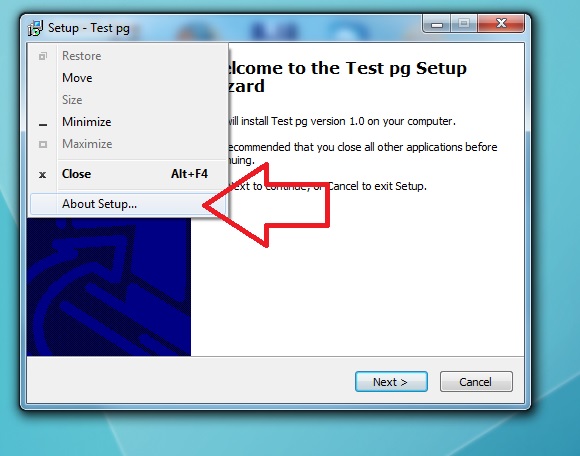
What about creating About dialog and adding it into NSIS's menu?

I saw something similar in Inno Setup and I think it is really nice feature which can propagate NSIS further.


Simple MessageBox could be enough, no large fancy stuff.

What's your opinion?
Anders#
Originally Posted by T.Slappy View Post
What about creating About dialog and adding it into NSIS's menu?

What's your opinion?
BrandingText is not enough?

I'm not a big fan of apps that change the system menu and adding to the bottom is horrible, that is right where close is supposed to be when you right-click its taskbar button on <= Vista.

If you wanted to put your own stuff there you could create a plugin...
TrifonovS#
I tried to compile one of my ready installers (compiled with v2.46) and I got the following error:

(C:\Program Files (x86)\NSIS\Include\StrFunc.nsh:52)
Internal compiler error: installer's shell constants are different than uninstallers!

abnormal program termination

Can you help me to solve it, please???
Anders#
Originally Posted by TrifonovS View Post
I tried to compile one of my ready installers (compiled with v2.46) and I got the following error:

(C:\Program Files (x86)\NSIS\Include\StrFunc.nsh:52)
Internal compiler error: installer's shell constants are different than uninstallers!
Could you provide a minimal code sample?
TrifonovS#
I tried to prepare for you a simpler installer that reproduces the problem, because my installer needs a lot of additional files, plug-ins,... But when I removed code from the script I found what makes the problem. I have my own MultyUser.nsh (of course with changed name). If I remove it, all works fine. Now I have to find out why it can be compiles with v2.46, but not with v3.0. If I need additional help I will ask again.
yclkvnc#
Hi Guys,

I will use NSIS for the first time. Even though issues are sourceforge or in this thread are minor, I'm not sure if I should use 3.0a1 since it's an alpha release.
Do you think it's stable enough or should I use 2.46 for now ?

Sorry if it's on wrong thread.
Anders#
Originally Posted by yclkvnc View Post

I will use NSIS for the first time. Even though issues are sourceforge or in this thread are minor, I'm not sure if I should use 3.0a1 since it's an alpha release.
Do you think it's stable enough or should I use 2.46 for now ?
The license URL bug is the only one the end user will see, if you don't have URLs in your license then I guess you can.

There should be another alpha soon. The remaining work before we can do betas is mainly POSIX related...
f0rt#
Big thanks for the NSIS Unicode work.

I am curious about the plans for POSIX.

The command "scons UNICODE=no utils makensis" fails to build the ANSI versions of utils and makensis from source. I thought about resurrecting the defunct ANSI makensis and utils for POSIX. This may sound awkward. However the wchar_t type is ambiguous and compiler-specific.

If the GNU C Compiler is instructed to override the underlying type for 'wchar_t' to be 'short unsigned int' by the flag '-fshort-wchar' then standard and third-party library code using the POSIX default definiton of wchar_t (32 bit) won't be usable from code compiled with '-fshort-wchar' due to incompatible wchar_t sizes. WCHAR could be used but also with the expense to reimplement the used standard library functions.

makensis and utils as ANSI/UTF-8 executables could be implemented in way to be able to produce Unicode installers. The plugins and stubs are anyway built in a version for ANSI as well as Unicode. One of the open issues is the internal representation of language and text strings. My guess is that UTF-8 could be easier converted into Unicode respectivly other required codepages. Though the current implementation of ANSI makensis seems to use CP_ACP (system default Windows ANSI code page) if I correctly understood the code.
Anders#
Why is using wchar_t (32bit) in makensis/cputils a problem?

The old ANSI makensis did not really care, all NSIS instructions are ASCII safe and anything above 127 is just "bytes" and so CP_ACP does not really come into the picture until setup is running on the end users machine IIRC...
JasonFriday13#
Hi, testing nsis 3.0a1 and I found a quirk (sorry if it's reported on the sf bug tracker, I haven't checked there yet). Firstly I like how the .nsi file can be ansi or unicode, and it will still compile to what the Unicode statement defines (true or false).

The quirk is that the license file has to be the same encoding as the Unicode statement, ie using an ansi license file with "Unicode true" results in a bunch of chinese or japanese characters. The other way round results in 3 weird chars and the rest is blank.

So I think the fix could be making the license file reading code the same as the .nsi reading code, where it doesn't matter what the input encoding is, it will output the correct encoding as defined with the Unicode statement.
Anders#
I wrote the nsi reader from scratch, the license handling mostly comes from the unicode fork/merge.

Just to be clear, you are talking about a .txt license file and not RTF?
JasonFriday13#
So the idea looks similar to this:

handle = openfile(filename.txt);
if (isUnicodeInstaller()) // returns true or false
{
if (isUnicodeFile(handle)) // if both the same, do nothing
{
}
else // ansi file, convert to unicode
{
convertToUnicode(handle);
}
else // ansi installer
{
if (isUnicodeFile(handle)) // if unicode file, convert to ansi
{
convertToAnsi(handle);
}
else // both the same, do nothing
{
}
}
I have had a quick look at the code for the license loading, but I don't understand alot of it because I'm not familiar with the c++ side, though it looks like the LoadLicenseFile function (in script.cpp) is converting the text to wchar_t regardless of the file encoding.
JasonFriday13#
I have done a bit more testing, and it turns out that .rtf files are fine, it's the .txt encoding that's the problem.
If it's ansi, the compiler will compile both ansi and unicode installers correctly.
If it's unicode, the compiler will throw the same error for both ansi and unicode installers. Compiler log:
SetCompressor: lzma
!define: "MUI_CUSTOMFUNCTION_GUIINIT"="onGUIinit"
!insertmacro: MUI_PAGE_LICENSE
LicenseData: wchar_t conversion failed!
Error in macro MUI_PAGEDECLARATION_LICENSE on macroline 17
Error in macro MUI_PAGE_LICENSE on macroline 6
Error in script "D:\Jason\Projects\maketest.nsi" on line 21 -- aborting creation process
Which is this part (CEXEBuild::LoadLicenseFile) in script.cpp:
// We have to convert the content of the license file to wchar_t
const WORD srccp=strm.StreamEncoding().IsUnicode() ? strm.StreamEncoding().GetCodepage() : AnsiCP;
const UINT cbcu=NStreamEncoding::GetCodeUnitSize(srccp);
if (sizeof(TCHAR) < cbcu)
{
l_errwcconv:
ERROR_MSG(_T("%s: wchar_t conversion failed!\n"),cmdname);
return PS_ERROR;
}
I will be diving into the source code for those first two lines to see what is happening, and if I can make a patch to fix this problem.

[edit]
I decided to test other encodings first. I use notepad in Windows 7 to save the encoding type. UTF-8 and Unicode big endian work fine, it's the vanilla Unicode setting that throws the error. I don't know what that encoding type is so unfortunately I can't go any further there.
[/edit]
Anders#
The problem is not the lines you posted, it was the Dup before the goto. Anyway, I fixed the bug...