Skip to content
⌘ NSIS Forum Archive

Windows 8.1 being detected as 8.0

13 posts

jweinraub#

Windows 8.1 being detected as 8.0

Sorry for posting this the other day and deleting it. My enduser told me about this issue and now I am seeing it happening for him and thought it was something else.

Anyway, I got this if statement that its supposed to do something if it is XP or Windows 8.0 to do one thing and if it is Windows Vista, 7, or 8.1 to do something else.
If I run this code on a Windows 8.1 machine, it will do the XP part of the if instead.

Any ideas as to why?

${If} ${AtMostWin2003}
${OrIf} ${IsWin8}
${OrIf} ${IsWin2012}
; DoXP
${Else}
; DoVista and above
${EndIf} 
aerDNA#
Are you a developer who uses NSIS to distribute your application? Are you a Winamp plug-in developer who wants to use NSIS to distribute your plug-in? Have suggestions for other people like you? This is the place.

Are you a developer who uses NSIS to distribute your application? Are you a Winamp plug-in developer who wants to use NSIS to distribute your plug-in? Have suggestions for other people like you? This is the place.
Anders#
Do you have RequestExecutionLevel in your script? Or add "ManifestSupportedOS Win7 Win8 Win8.1 {8e0f7a12-bfb3-4fe8-b9a5-48fd50a15a9a}"
Anders#
You should always use RequestExecutionLevel in your scripts, just put it near the top along with OutFile etc
jweinraub#
Something like:
Name "Foobar Software ${PRODUCT_VERSION}"
RequestExecutionLevel admin
OutFile "setup.exe" 
I think that did the trick, but that sysnative thing you helped me previously with does not work on 8.1 32-bit.

nsExec::Exec '"$windir\sysnative\netcfg.exe" 
On a side question, I use HM NSIS Edit and for some reason, when it compiles it no longer shows the compiler output no more. It just shows processing...a long delay, then the output of the setup when it is completed.
Anders#
sysnative only exists when a 32-bit program runs on a 64-bit version of Windows. Use x64.nsh to detect and fall back to $sysdir.

The default makensis verbosity has changed in v3.0.
jweinraub#
Originally Posted by Anders View Post
sysnative only exists when a 32-bit program runs on a 64-bit version of Windows. Use x64.nsh to detect and fall back to $sysdir.

The default makensis verbosity has changed in v3.0.
Thank you. that did the trick. any idea how i can change the verbosity? if i use makensisw from the program files folder it seems to show me more info.
Anders#
Makensisw starts makensis with /v4. If you cannot change the commandline in your IDE you can use "!verbose 4" in your script.
jiake#
    GetDLLVersion "$SYSDIR\kernel32.dll" $R0 $R1
IntCmpU $R0 0x00060003 _win_8_1 0 _win_def
IntCmpU $R0 0x00060002 _win_8
IntCmpU $R0 0x00060001 _win_7
IntCmpU $R0 0x00060000 _win_vista _win_def
_win_8_1:
DetailPrint "Windows 8.1"
Goto _win_done
_win_8:
DetailPrint "Windows 8"
Goto _win_done
_win_7:
DetailPrint "Windows 7"
Goto _win_done
_win_vista:
DetailPrint "Windows Vista"
Goto _win_done
_win_def
DetailPrint "Other Windows version."
_win_done:
Yathosho#
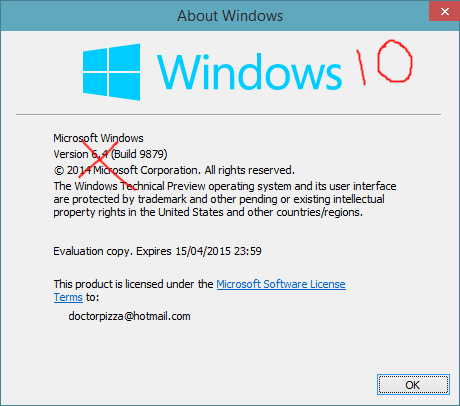
slighty off-topic, but i just ran across this

Anders#
Originally Posted by Yathosho View Post
slighty off-topic, but i just ran across this

http://arstechnica.com/information-t...probably-work/
That's what happens when you let the marketing people mess with the version numbers.

It's Firefox all over again; version numbers don't matter to "normal" people so let's bump our number fast so we catch up with the competition (OSX 10.*, Chrome 3?.*).