Skip to content
⌘ NSIS Forum Archive

How add to ListView only the latest versions

6 posts

BuZzOFF#

How add to ListView only the latest versions

Hi. Tell me please. There is a text file with a list of programs. Cycle values are read and added to the ListView.
How to sort the values so that added the only last version of products to the ListView.

Download .nsi file


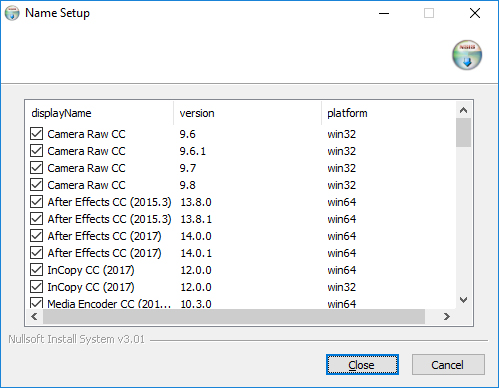
Example. Before:
  • Camera Raw CC 9.6 win32
  • Camera Raw CC 9.6.1 win32
  • Camera Raw CC 9.7 win32
  • Camera Raw CC 9.8 win32
  • After Effects CC (2015.3) 13.8.0 win64
  • After Effects CC (2015.3) 13.8.1 win64
  • After Effects CC (2017) 14.0.0 win64
  • After Effects CC (2017) 14.0.1 win64
  • InCopy CC (2017) 12.0.0 win64
  • InCopy CC (2017) 12.0.0 win32
  • ...e.t.c.


After:
  • Camera Raw CC 9.8 win32
  • After Effects CC (2015.3) 13.8.1 win64
  • After Effects CC (2017) 14.0.1 win64
  • InCopy CC (2017) 12.0.0 win64
  • InCopy CC (2017) 12.0.0 win32
  • ...e.t.c.


P.S. Sorry for the Google Translator..
Anders#
The Listview control does not really have a filter functionality, it is probably best if you filter the list before you add the items to the Listview...
BuZzOFF#
@Anders, thanks for the answer.

The file is stored on the Internet and with the release of new versions updated the developer. I can't to filter values before to add to the list... I know how to compare versions, apply logic... and others. But can't get to insert all this in a loop, so that added the only last version of products.
BuZzOFF#
How to weed out the values in the cycle?..
Before adding in the ListView.

  OutFile "tmp1.exe"
  !include ".\Include\CommCtrl.nsh"
  !include "nsDialogs.nsh"
  !include "Logiclib.nsh"
  !include "WordFunc.nsh"
  !include "MUI2.nsh"
  Page custom PageListView
  
  !insertmacro MUI_LANGUAGE "English"
var Dialog
var ListView
var Item1
var Item2
var version
var platform
var displayName
var LineValue
var File
Function PageListView
  nsDialogs::Create 1018
  Pop $Dialog
  ${NSD_CreateListView} 0u 0u 100% 100% "ListView"
  Pop $ListView
  System::Call "*(i,i,i,i)i.R0"
  System::Call "user32::GetClientRect(i$ListView,iR0)"
  System::Call "*$R0(i.R1,i.R2,i.R3,i.R4)"
  IntOp $R3 $R3 / 3
  ${NSD_LV_InsertColumn} $ListView 0 $R3 "displayName"
  ${NSD_LV_InsertColumn} $ListView 1 $R3 "version"
  ${NSD_LV_InsertColumn} $ListView 2 $R3 "platform"
  !define /math _LISTVIEW_TEMP_STYLE ${LVS_EX_CHECKBOXES} | ${LVS_EX_FULLROWSELECT}
  SendMessage $ListView ${LVM_SETEXTENDEDLISTVIEWSTYLE} 0 ${_LISTVIEW_TEMP_STYLE}
  !undef _LISTVIEW_TEMP_STYLE
  FileOpen $File "$EXEDIR\products.txt" r
  ${Do}
    FileRead $File $LineValue
    ${If} $LineValue == ""
      ${ExitDo}
    ${EndIf}
    ${WordFind2X} "$LineValue" "<displayName>" "</displayName>" "+1" $displayName
    ${WordFind2X} "$LineValue" "<platform>" "</platform>" "+1" $platform
    ${WordFind2X} "$LineValue" "<version>" "</version>" "+1" $version
    IntOp $Item1 $Item1 + 1
    ${NSD_LV_InsertItem} $ListView $Item1 "$displayName"
    IntOp $Item2 $Item1 - 1
    ${NSD_LV_SetItemText} $ListView $Item2 1 "$version"
    ${NSD_LV_SetItemText} $ListView $Item2 2 "$platform"
    ${NSD_LV_SetCheckState} $ListView $Item2 1
  ${LoopUntil} $LineValue == ""
  FileClose $File
  nsDialogs::Show
  System::Call "comctl32::ImageList_Destroy(iR0)"
FunctionEnd
Section
SectionEnd 
Anders#
LVM_FINDITEM can be used to find items in the listview but it seems like it would be less work to filter the list first.

In a loop you can write to a .ini file in $pluginsdir: appname=version if the version is higher. Then in the 2nd loop you only add items to the listview that match the version in the .ini.